
Product 
RippleHire AI
Solutions
Customers
Resources
Comparisons
Company
.svg) Product
ProductCore Modules
Extended Modules
Experience

Product 
Core ModulesProduct
Extended ModulesProduct
Experience
RippleHire AIMeet the agents
How the plateform works
Responsible AI & Governance
RippleHire AI
Meet the agentsRippleHire AI
How the platform worksRippleHire AI
Responsible AI & Governance
SolutionBy Role
By Industry
By Hiring Type
.png)
Solutions
By Role Solutions
By IndustrySolutions
By Hiring Type
CustomersCustomer Stories
Proof & Community
Watch our new season Podcast - TS Talks!

Customers
Customer StoriesCustomers
Proof & Community
ResourcesLearn
Meet Us
Talent science
Unlock groundbreaking insights into people, culture, and talent acquisition.
 Download
our Exclusive Ebook
Download
our Exclusive Ebook
Advanced thinking in talent science and culture Actionable frameworks for HR leaders Case studies and results from industry pioneers
Resources
Talent science
Comparisons
CompanyAbout us
Talent science
Newsroom
Company
Talent science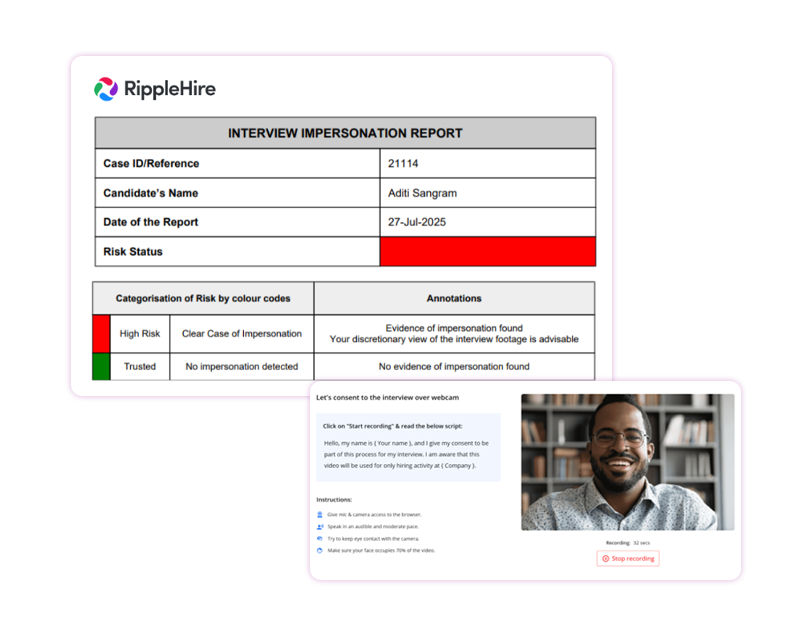
.png "image (8)")
.svg) One-click consent: Auto-send video links when interviews are scheduled
One-click consent: Auto-send video links when interviews are scheduled.svg) Web-based recording: No app install required (Desktop & Mobile)
Web-based recording: No app install required (Desktop & Mobile) Guided experience: On-screen script ensures clear consent
.svg) Liveness detection: iBeta Level 1 & 2 compliant checks for spoofs/deepfakes
Liveness detection: iBeta Level 1 & 2 compliant checks for spoofs/deepfakes.svg) Clear status tags: "Clear" or "Breach" visible inside RippleHire
Clear status tags: "Clear" or "Breach" visible inside RippleHire.svg) Configurable blocks: Restrict offers or scheduling if checks fail
Configurable blocks: Restrict offers or scheduling if checks fail Auto-triggers: Video consent requests sent on schedule
-1.svg) Secure storage: Recordings stored in candidate profile for audit
Secure storage: Recordings stored in candidate profile for audit
Shared visibility: Results and overrides logged in Collaboration tab
Permission controls: Only authorized users can override a breach
.png "image (9)")
%201-1.svg)
Reduced proxy risk
Catch fraud early with AI liveness detection

Stronger compliance
Maintain a digital audit trail of consent and identity
-2.svg)
Faster decisions
"Clear" or "Breach" tags help recruiters decide instantly
Better experience
Quick video steps replace lengthy manual verifications