Unlock groundbreaking insights into people, culture, and talent acquisition.
Download our Exclusive Ebook
Advanced thinking in talent science and culture Case studies and results from industry pioneers
-
The Psychology of Talent
Exploring what drives motivation, ambition, and growth within organizations
-
Cultural Alignment
Uncovering the role of shared values in building strong, cohesive teams.
-
Behavioral Science in Hiring
Applying psychological principles to enhance talent decisions.
-
Diversity & Inclusion Dynamics
Understanding how inclusive cultures drive innovation and belonging
-
Predictive Talent Models
Abstract frameworks for forecasting success and potential in recruitment.
-
Strategic Workforce Planning
Aligning talent strategies with evolving business needs
-
Data-Driven Decision Making
Aligning talent strategies with evolving business needs.
-
Lifecycle of Talent Acquisition
Conceptualizing hiring as a continuous, integrated journey.
Run every interview with confidence and structure
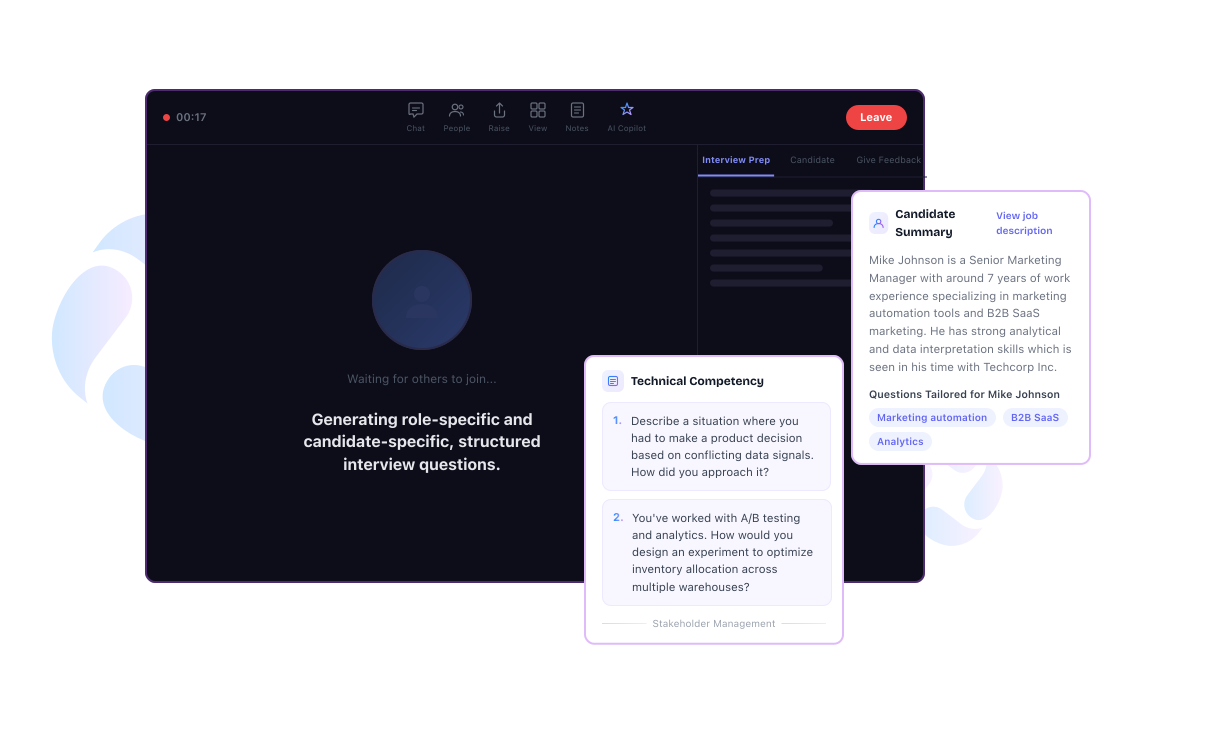
Meet Interviewer Copilot—your AI assistant inside Microsoft Teams and RippleHire. It prepares questions, context, and structure for every interview so you can focus on the candidate.
.png)
Great hiring depends on great interviews
Even the best sourcing efforts fail if interviews are unstructured. When interviewers juggle resumes, notes, and tools, it leads to bias and delayed feedback. Interviewer Copilot brings context, questions, and structure into a single panel, ensuring every interview stays focused on fair evaluation.
An AI-powered assistant that sits inside your interviews
Interviewer Copilot is an advanced AI assistant available directly inside Microsoft Teams and the RippleHire feedback page. It analyzes the job description, resume, and round details to generate structured, specific questions. Crucially, the panel is visible only to your team—candidates never see the AI suggestions.
Let Copilot handle the prep so your teams can focus on the candidate
Work without friction. Admins configure it once, recruiters schedule as usual, and the AI runs in the background. By the time the interviewer joins the meeting, the Copilot panel is ready with questions and context—no manual prep required.
Zero extra steps: Recruiters schedule interviews as usual
Context-aware: Round descriptions guide question generation
Instant access: Questions are ready when the meeting starts
Seamless sync: Updates candidate profile automatically
.png)
From manual prep to intelligent, structured interviews
Significant time savings
Stop drafting questions manually or jumping between docs
Consistent evaluations
Standardize questions to reduce variability between interviewers
Reduced bias
Focus on skills and role requirements rather than gut feel
Deeper assessment
Use previous transcripts to avoid repetitive questions
Streamlined feedback
Capture structured evaluations in real-time
Interviewer Copilot is part of RippleHire’s High-Performance ATS.
RippleHire connects demand creation, sourcing, interviews, offers, and onboarding into a single high-performance workflow.
See how AI helps your team run faster, fairer, and more effective hiring processes. Already a RippleHire customer? Contact your Customer Success Manager to activate Interviewer Copilot in your RippleHire ATS.
FAQs
1. What is an Interviewer Copilot in RippleHire?
It is an AI-powered assistant inside Microsoft Teams and the RippleHire feedback page. It generates structured questions and surfaces candidate details to help interviewers run focused, consistent interviews.
2. Can candidates see the Interviewer Copilot questions?
No. The panel and questions are visible only to internal team members (interviewers and recruiters). It is completely hidden from candidates.
3. How does Interviewer Copilot generate interview questions?
The system analyzes the job description, candidate resume, round description, and previous transcripts (if available) to create relevant questions for that specific stage.
4. What types of interviews does Interviewer Copilot support?
It supports introductory, technical, and non-technical rounds. Questions are categorized (e.g., technical competency, cultural fit) based on the round description.
5. Do interviewers need to manually activate Interviewer Copilot for each meeting?
No. Once enabled by an admin, it activates automatically for scheduled interviews. Interviewers simply open the RH Interviewer Copilot tab in Teams or the feedback page.
6. What happens if an interview is rescheduled?
The same set of AI-generated questions and context automatically transfer to the new meeting time. No reconfiguration is needed.
7. Is Interviewer Copilot available outside Microsoft Teams?
It is available inside Microsoft Teams and on the RippleHire feedback page, supporting both video calls and face-to-face/telephonic interviews.
8. What setup is required to enable Interviewer Copilot for our organization?
An admin needs to enable the feature in RippleHire, configure round descriptions, and publish the app in your Microsoft Teams store. Once done, it works seamlessly for all eligible rounds.