

.png)
Every uploaded document becomes a structured, auditable record
From first upload through final approval, with no separate login and no manual reconciliation.


.svg) Product
Product Core Modules
Extended Modules
Experience
RippleHire AI
Meet the agents
How the platform works
Responsible AI & Governance
Solution
By Role
By Industry
By Hiring Type
Customers
Core Modules
Extended Modules
Experience
RippleHire AI
Meet the agents
How the platform works
Responsible AI & Governance
Solution
By Role
By Industry
By Hiring Type
Customers Customer Stories
Proof & Community
Resources
Customer Stories
Proof & Community
Resources Download
our Exclusive Ebook
Download
our Exclusive Ebook
Advanced thinking in talent science and culture Actionable frameworks for HR leaders Case studies and results from industry pioneers
Talent science
Comparisons
Company
Talent science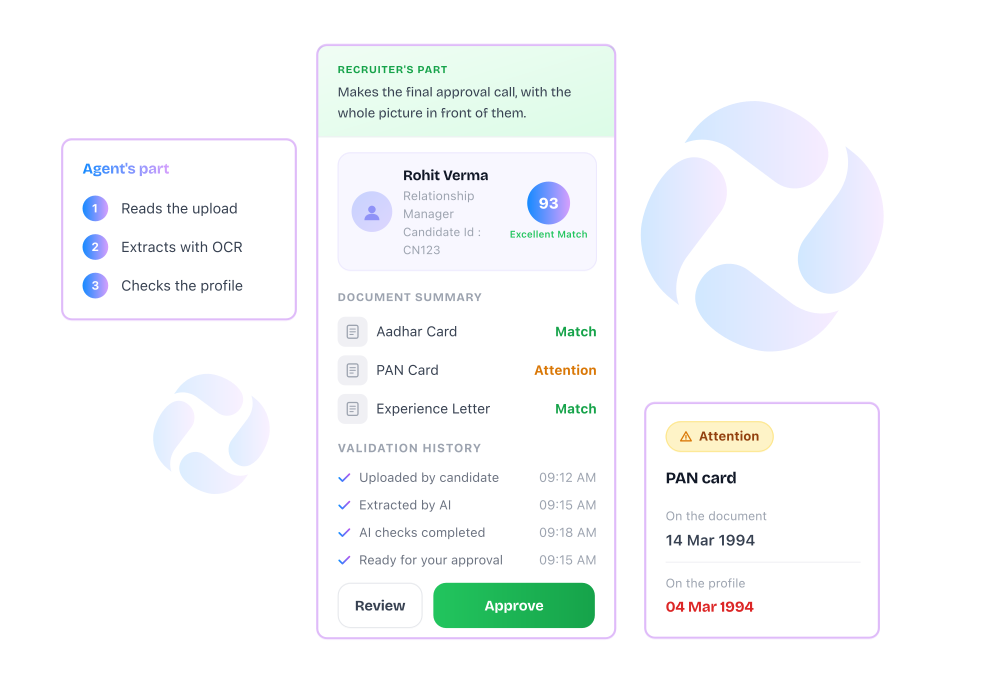
.png "image (8)")
 Upload: Candidates submit through a guided portal, with format and type checked on arrival.
 Extraction: OCR converts the document into structured fields without any manual entry.
 AI Checks: Face detection and document-specific validation run against each file type.
 Comparison: Extracted data is checked against the profile and your configured rules.
 Status: The system assigns Match or Attention, with the specific mismatch named. Review: Attention items reach a recruiter with evidence attached and a logged decision.
 Candidates upload once through a guided, mobile-friendly portal
-1.svg) Recruiters see Match, Attention, or Approved status without opening every file
Recruiters see Match, Attention, or Approved status without opening every file
Override decisions are logged with recruiter name, timestamp, and document details
Downloadable verification reports support BGV handoffs and compliance reviews
.png "image (9)")

Verification runs the moment a candidate uploads, so offer timelines stop waiting on a manual check.

OCR and AI catch mismatches at the point of upload, well before they surface in background verification.

Every check, flag, and approval is logged with a name and a timestamp, exportable for a compliance review.
From first upload through final approval, with no separate login and no manual reconciliation.