

.png)
One page, from first candidate to last slot.
Campus drives, walk-ins, and weekend drives all run through the same page, from adding a candidate to allocating their interview.


.svg) Product
Product Core Modules
Extended Modules
Experience
RippleHire AI
Meet the agents
How the platform works
Responsible AI & Governance
Solution
By Role
By Industry
By Hiring Type
Customers
Core Modules
Extended Modules
Experience
RippleHire AI
Meet the agents
How the platform works
Responsible AI & Governance
Solution
By Role
By Industry
By Hiring Type
Customers Customer Stories
Proof & Community
Resources
Customer Stories
Proof & Community
Resources Download
our Exclusive Ebook
Download
our Exclusive Ebook
Advanced thinking in talent science and culture Actionable frameworks for HR leaders Case studies and results from industry pioneers
Talent science
Comparisons
Company
Talent science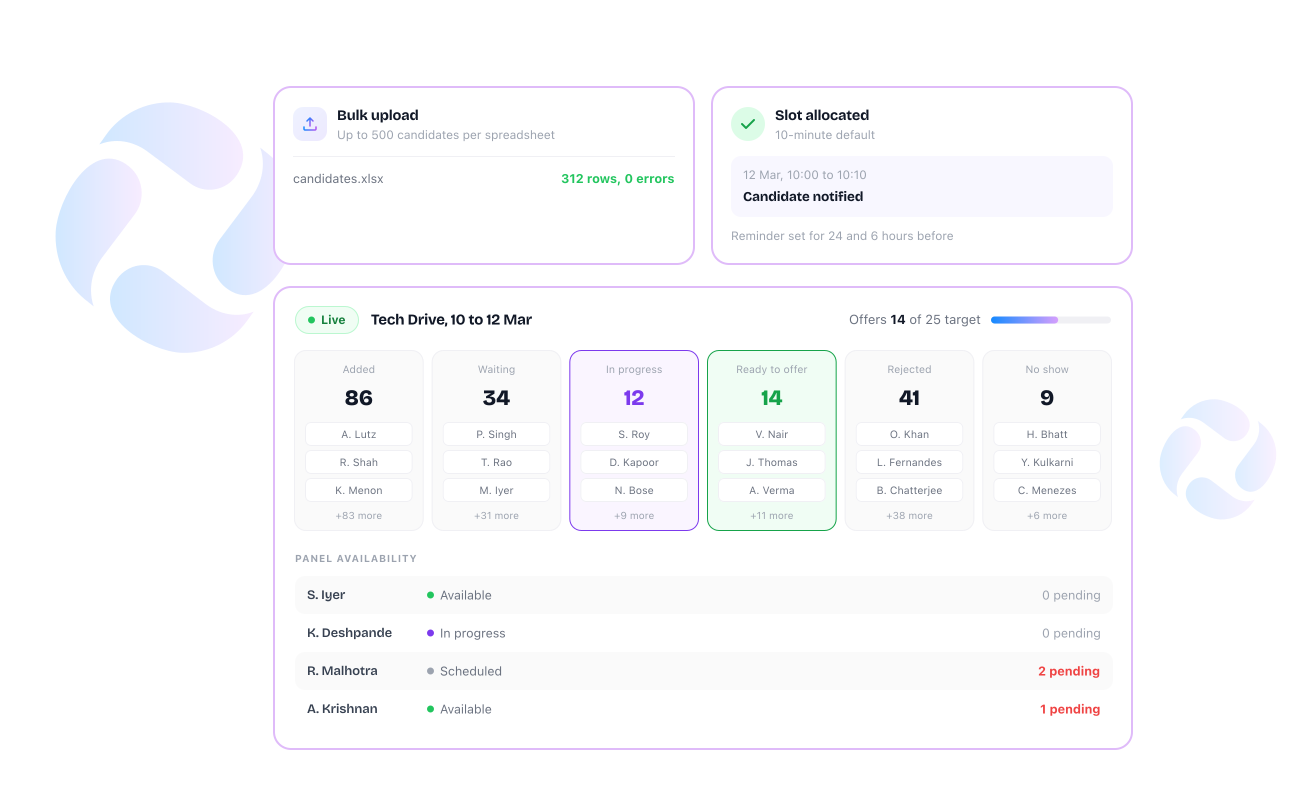
.png "image (8)")
 Set up a drive once and it's ready to run: Enter the drive details in one place and start managing candidates from the same page.
  Fill a drive fast, one candidate or a few hundred at once: search by RH ID, name, phone, email, job ID, or title, or upload a spreadsheet in bulk
 Keep a candidate's status honest at every step: move them between rounds, reject, move to offer, or remove, with a reason recorded for moves and rejections
 Get a candidate booked without back and forth over timing: allocate a date and time slot, with a 10-minute default the recruiter can change
 Know who's actually free before reaching out: panel availability shows as scheduled, in progress, or available, with pending feedback counted per interviewer See exactly where a drive stands: Track whether a drive is live, pending, completed, cancelled, or closed, and see how long it's been in progress.
  Candidates aren't left wondering if they've been forgotten: they receive an invitation when they're added, followed by reminders before the drive and their allocated interview slot.
-1.svg) Recruiters know where a candidate stands without asking around: which round they're currently in, from added to ready to offer or no show
Recruiters know where a candidate stands without asking around: which round they're currently in, from added to ready to offer or no show
Finding the right drive takes seconds, not a search through folders: by name, tag, or drive manager, filtered by status or date range
Progress toward the hiring target isn't a guessing game: the number of offers made against target is visible on the drive home page and inside the drive
.png "image (9)")

Add up to 500 candidates at once using a single spreadsheet upload, and a slot gets allocated to any candidate without leaving the drive page.

Candidates, rounds, panel availability, and drive status all sit on one page.

The number of offers made against the target is visible at a glance, right on the drive page.
Campus drives, walk-ins, and weekend drives all run through the same page, from adding a candidate to allocating their interview.