
.png)
Let panels answer once.
A recruiter's time belongs with candidates. RippleHire keeps interview panels ready and schedules moving, so every conversation happens on time.


.svg) Product
Product Core Modules
Extended Modules
Experience
RippleHire AI
Meet the agents
How the platform works
Responsible AI & Governance
Solution
By Role
By Industry
By Hiring Type
Customers
Core Modules
Extended Modules
Experience
RippleHire AI
Meet the agents
How the platform works
Responsible AI & Governance
Solution
By Role
By Industry
By Hiring Type
Customers Customer Stories
Proof & Community
Resources
Customer Stories
Proof & Community
Resources Download
our Exclusive Ebook
Download
our Exclusive Ebook
Advanced thinking in talent science and culture Actionable frameworks for HR leaders Case studies and results from industry pioneers
Talent science
Comparisons
Company
Talent science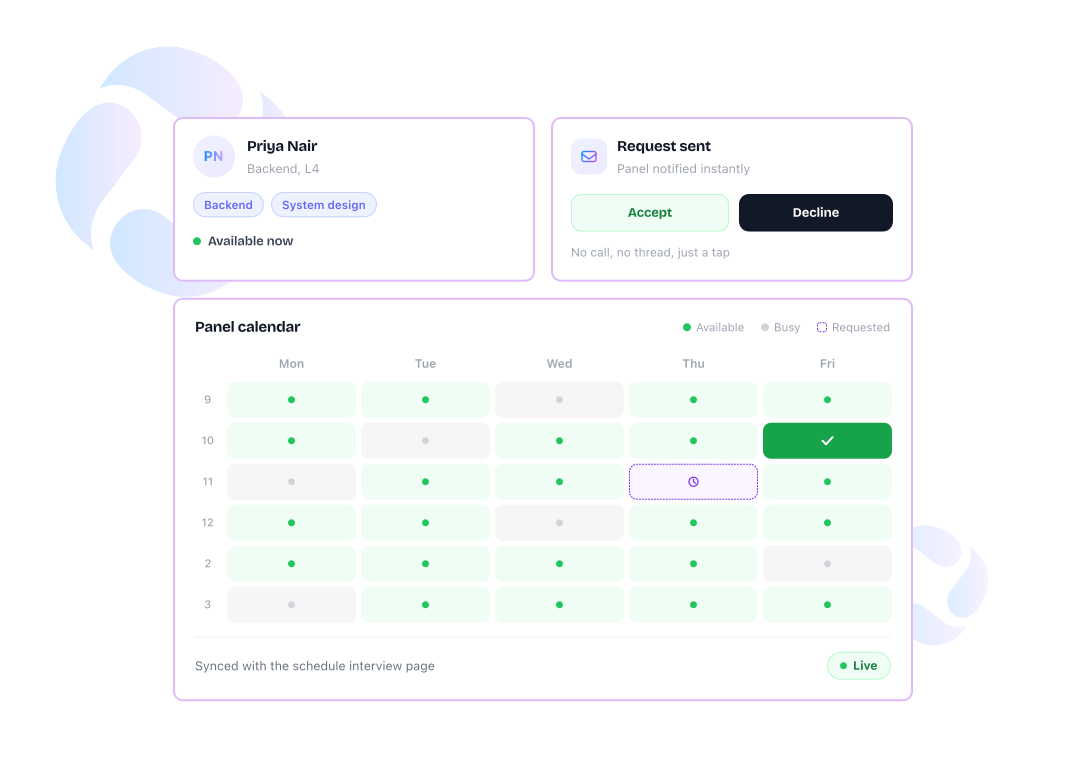

 Panels are tagged by skill, grade, and round, so a recruiter can filter to the right interviewer instantly
 A time slot request goes out from the dashboard, and the panel gets a mail the moment it's sent
 Panels reply from that mail or their own requests page, choosing to accept, edit, or decline
 A slot that clashes with an existing booking gets caught automatically, before it's confirmed
 The panel's calendar feeds straight into the schedule interview page, so free time is visible while booking
 Every reschedule or cancellation is recorded against the panel, building a track record without extra effort
 A recruiter can check where a request stands without opening their inbox
-1.svg) A panel handles every pending request from one page, with everything in one view.
A panel handles every pending request from one page, with everything in one view.
Clashing time slots surface immediately, before either side finds out later
Cancellation and reschedule history sits on the panel's profile for anyone to see
.png "image (9)")

The dashboard shows who's actually free, so a request goes out to someone who can actually take it.

Get caught at the point of booking, before a candidate is already on a call.

Reschedule and cancel history builds on its own, so reliability is something you can look up.
A recruiter's time belongs with candidates. RippleHire keeps interview panels ready and schedules moving, so every conversation happens on time.