Product


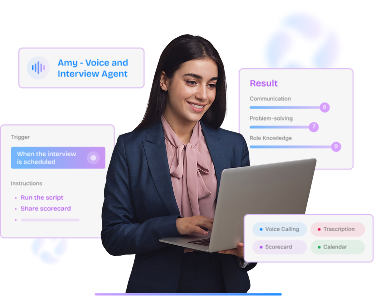



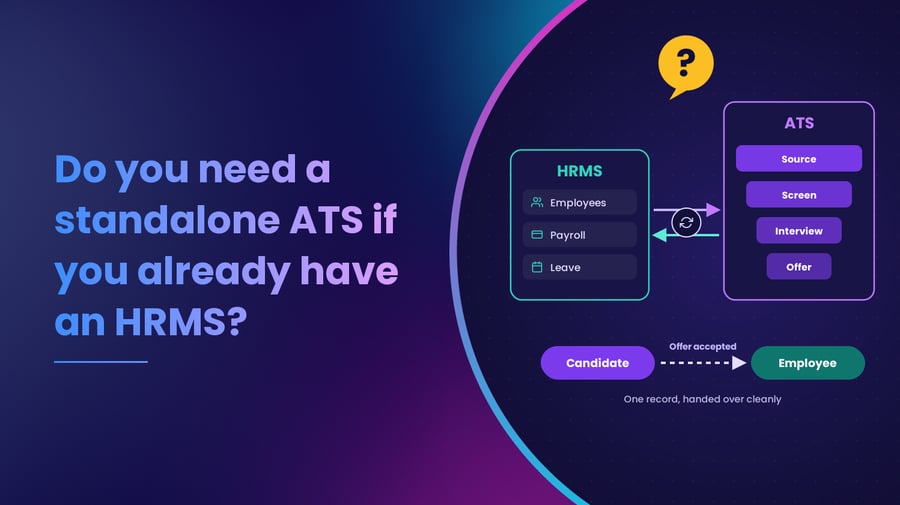


Table of content
Your CIO has a reasonable question: why should the company pay for a standalone applicant tracking system (ATS) when the existing HRMS already includes a recruiting module?
The answer depends on how complex your recruitment operations have become. An HRMS recruiting module can work well for organizations with relatively simple hiring needs. As enterprises expand into high-volume recruitment, campus drives, multiple geographies and specialized hiring workflows, these modules may struggle to support everything talent acquisition teams need.
The real test is whether your existing HRMS can support your recruiting workflows at the speed and scale your business requires. This guide explains where HRMS recruiting modules work well, where a standalone ATS becomes useful, and how enterprises can make both systems work together.
What an HRMS recruiting module already does well
An HRMS manages the employee lifecycle, including employee records, payroll, attendance, benefits and performance management. Many platforms also include recruitment capabilities. For organizations with predictable hiring volumes and straightforward recruitment processes, these modules offer several advantages:
- Centralized employee information: Recruitment data connects with existing employee records, organizational structures and position information.
- Simpler workforce planning: Approved headcount, reporting relationships and vacant positions can flow into recruitment requisitions.
- Fewer systems to manage: HR teams can handle recruitment and core HR processes within their existing technology environment.
- Smoother employee creation: Once someone joins, their approved information moves into the employee database without repeated data entry.
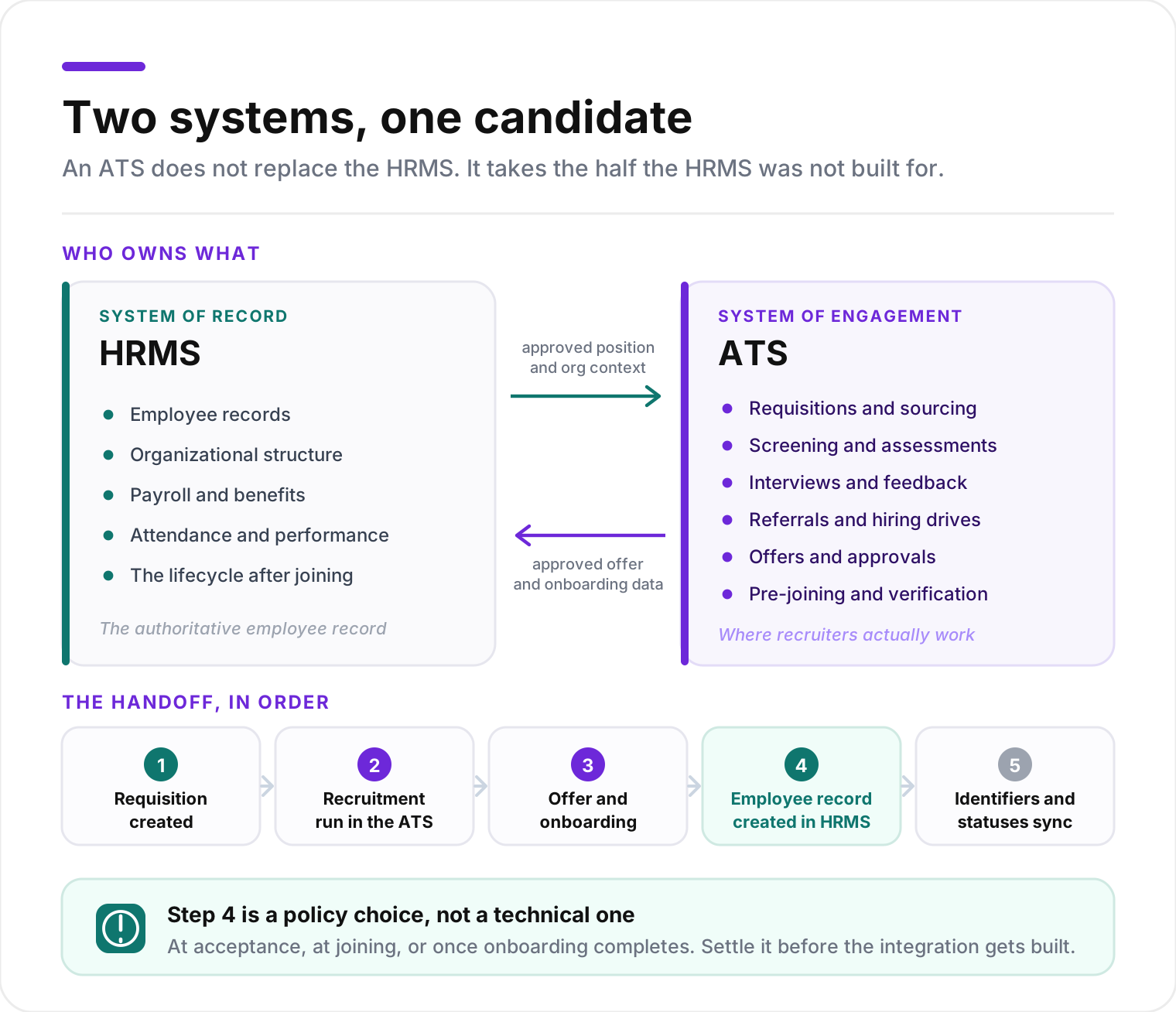
These advantages matter, particularly when organizations want consistent data and governance across HR functions. An enterprise HRMS may also support advanced recruiting capabilities, depending on its configuration and licensed modules. So the question to ask is whether those capabilities support the hiring your organization actually does.
Where HRMS recruiting modules can struggle with enterprise hiring
Recruitment involves a different set of users and activities from core HR operations. Thousands of external candidates may interact with the system, while recruiters coordinate assessments, interviews, approvals and communications across several teams. As these activities grow more complex, gaps in an HRMS recruiting module start to affect recruiter productivity and hiring speed.
1. Keeping candidates moving without adding recruiter workload
Consider what happens when several business units are hiring at once. Recruiters must acknowledge applications, share screening outcomes, schedule interviews and keep candidates informed about next steps. When each of these depends on a manual update, delays become more likely as application volumes rise.
Those delays carry a cost. In SHRM’s 2025 Talent Trends research, 41% of organizations facing recruiting difficulties named candidate ghosting as a top challenge.
A recruiting platform should help TA teams with:
- Mobile-friendly application journeys
- Automated communication throughout recruitment
- Status visibility across hiring stages
- Personalized reminders and follow-ups
- Consistent processes across roles and locations
The goal is to keep every candidate informed at scale while recruiters focus on the conversations that need them. For more practical guidance, see how to keep candidates engaged after interviews.
2. Handling campus recruitment and walk-in drives
Enterprise hiring involves several distinct recruitment models. Campus recruitment requires coordination with institutions, bulk registrations, assessments, interview panels and offers for large candidate groups. Walk-in recruitment adds on-site registration, candidate queues, interviewer availability and same-day decisions.
A general-purpose recruiting module may track candidates while leaving these activities to separate tools or manual coordination. A walk-in drive, for example, needs to show coordinators which candidates are waiting, which interviewers are free and where each candidate should go next. Recruiters also need immediate access to assessment results and interview feedback. These requirements explain why enterprises invest in dedicated workflows for campus hiring and walk-in recruitment.
3. Coordinating interviews across teams and locations
Scheduling gets complicated when candidates go through multiple interview rounds with different stakeholders. Recruiters need interviewer availability, structured evaluation forms and feedback from earlier rounds. For high-volume hiring, they may also manage interview panels across locations or route waiting candidates to available interviewers.
An enterprise recruiting system should help teams:
- Find available interview slots
- Assign interviewers based on role and requirements
- Collect structured feedback after each round
- Track pending evaluations and interviewer responsiveness
Without these capabilities, recruiters spend significant time coordinating calendars and chasing decisions.
4. Managing identity checks, documents and compliance
Enterprise recruitment also involves verifying candidate information and keeping evidence of decisions. That can include employment history, education credentials, identity information, background verification outcomes and offer approvals, with requirements that vary across industries and countries.
A recruiting system needs traceable records of evaluations, changes, approvals and verification outcomes. It should also support access restrictions, retention rules and human review of flagged discrepancies. When verification information is spread across email, spreadsheets and external systems, reconstructing a hiring decision becomes difficult, and that creates compliance and operational risk.
5. Introducing AI agents into recruiting workflows
AI agents can support screening, interview scheduling, follow-ups and collecting preliminary information. Their value depends on how well they connect with the rest of the recruitment process.
An AI screening agent needs the correct job requirements and candidate information. When it finishes its task, the results must reach the recruiter and update the workflow. Interview agents, document verification and candidate communication need the same kind of coordination.
Enterprises should check whether their HRMS recruiting module can support these agents with suitable permissions, review steps and audit trails. AI delivers results when it’s built into the workflow recruiters already use.
Five signs your enterprise has outgrown its HRMS recruiting module
The case for a standalone ATS becomes clearer when system limitations keep affecting hiring outcomes. Use this table to see where your organization stands.
| Signal | What you’re experiencing | What to evaluate in an ATS |
|---|---|---|
| 1. Recruiters depend on spreadsheets | Teams keep separate trackers for interviews, candidate statuses and approvals | Centralized workflows and real-time hiring visibility |
| 2. Hiring drives need manual coordination | Campus or walk-in recruitment relies on separate registration, assessment and interview tools | Dedicated bulk hiring and drive management |
| 3. Candidates regularly wait for updates | Recruiters manually chase feedback and communicate next steps | Automated communication and interview coordination |
| 4. Verification and compliance records are scattered | Documents, approvals and verification results sit in different systems | Integrated verification workflows and traceable audit records |
| 5. New requirements need workarounds | Adding AI agents or specialized hiring workflows requires heavy customization | Configurable recruiting workflows and integrations |
A single limitation is usually something you can work around. Recurring problems across several of these areas suggest the existing module may no longer meet your needs. For a broader evaluation, read why enterprise recruiting needs an ATS.
How a standalone ATS and HRMS work together
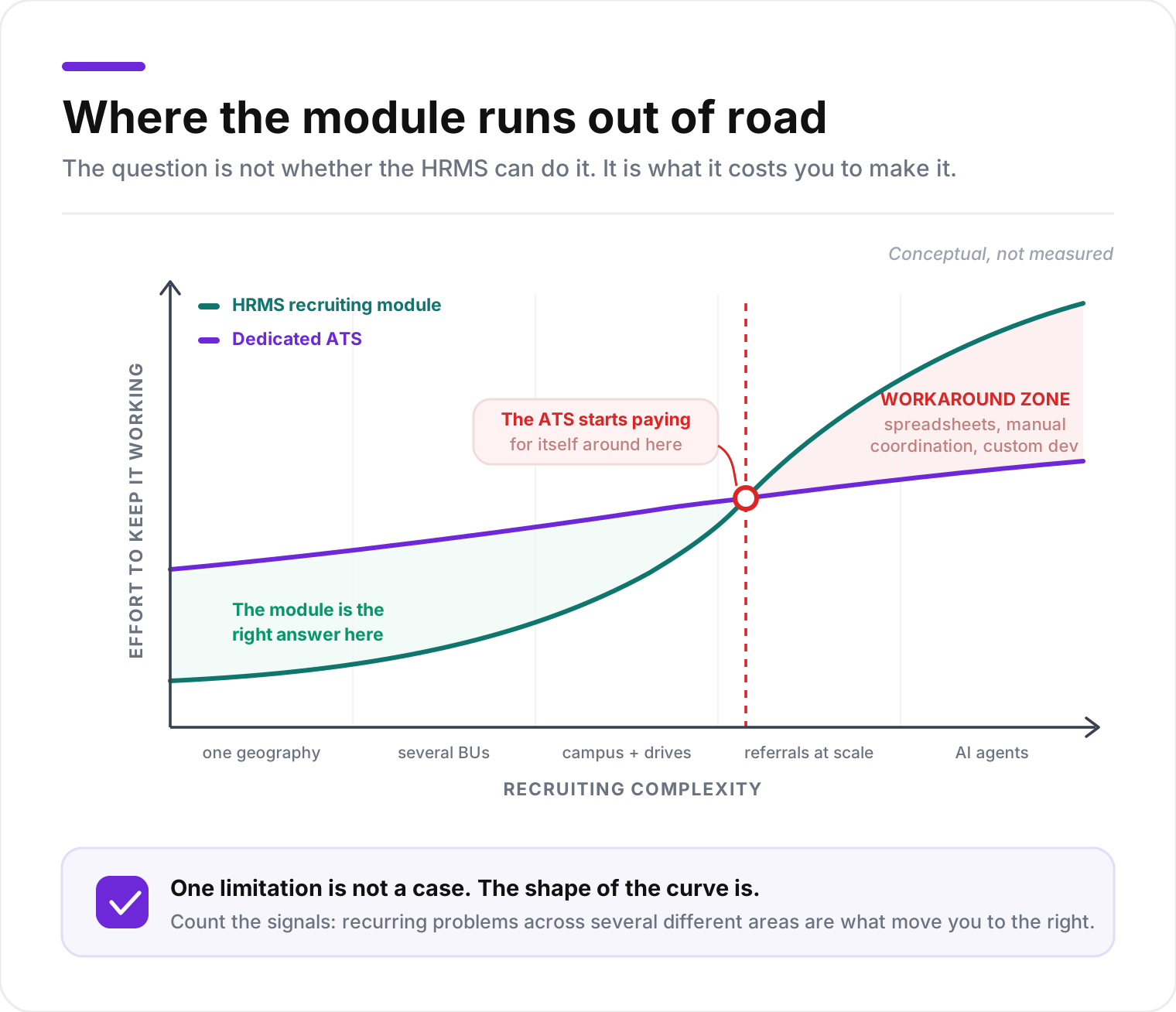
Most enterprises that add a standalone ATS keep their HRMS and run an integrated setup where each system has clearly defined responsibilities.
The ATS manages recruitment
The ATS is the system of engagement for recruiters, hiring managers and candidates. It handles:
- Job requisition workflows and sourcing
- Candidate screening and assessments
- Interview scheduling and feedback
- Hiring drives
- Offer approvals and candidate communication
- Pre-joining engagement and verification
Recruiters work within the ATS throughout the hiring lifecycle.
The HRMS maintains the employee record
The HRMS remains the authoritative system for employee data, organizational structure, payroll and other core HR processes. Approved position information can flow from the HRMS into the ATS, so recruitment starts with the right organizational context. As a candidate moves through offer and onboarding, the ATS sends approved information back to the HRMS according to the agreed integration design. Once the candidate joins, the HRMS manages their employee record.
Integration connects the two systems
A typical ATS and HRMS integration follows this sequence:
- Requisition creation: An approved position or hiring request becomes available in the ATS.
- Recruitment execution: Recruiters manage candidates, interviews, evaluations and offers in the ATS.
- Offer and onboarding: The ATS captures approved offer details and coordinates required pre-joining activities.
- Employee creation: The HRMS receives the validated information it needs to create or update the employee record.
- Status synchronization: Both systems exchange identifiers and status updates to stay consistent.
The exact handoff depends on your policies. Some enterprises create employee records after offer acceptance, while others wait until joining or until specific onboarding requirements are complete. The integration should also define which system owns each data field, how duplicate records are prevented and how failed transfers are reconciled. Structured onboarding and appointment workflows can help teams complete documentation and verification before information moves into core HR.
How to decide whether the investment is justified
Before adding a standalone ATS, CIOs and CHROs should assess the financial and operational impact of the current recruitment process. Technology utilization deserves particular attention: a 2024 Gartner survey found that only 24% of HR employees believed their HR function was getting maximum value from HR technology. A new platform without a clear implementation and adoption plan can add complexity.
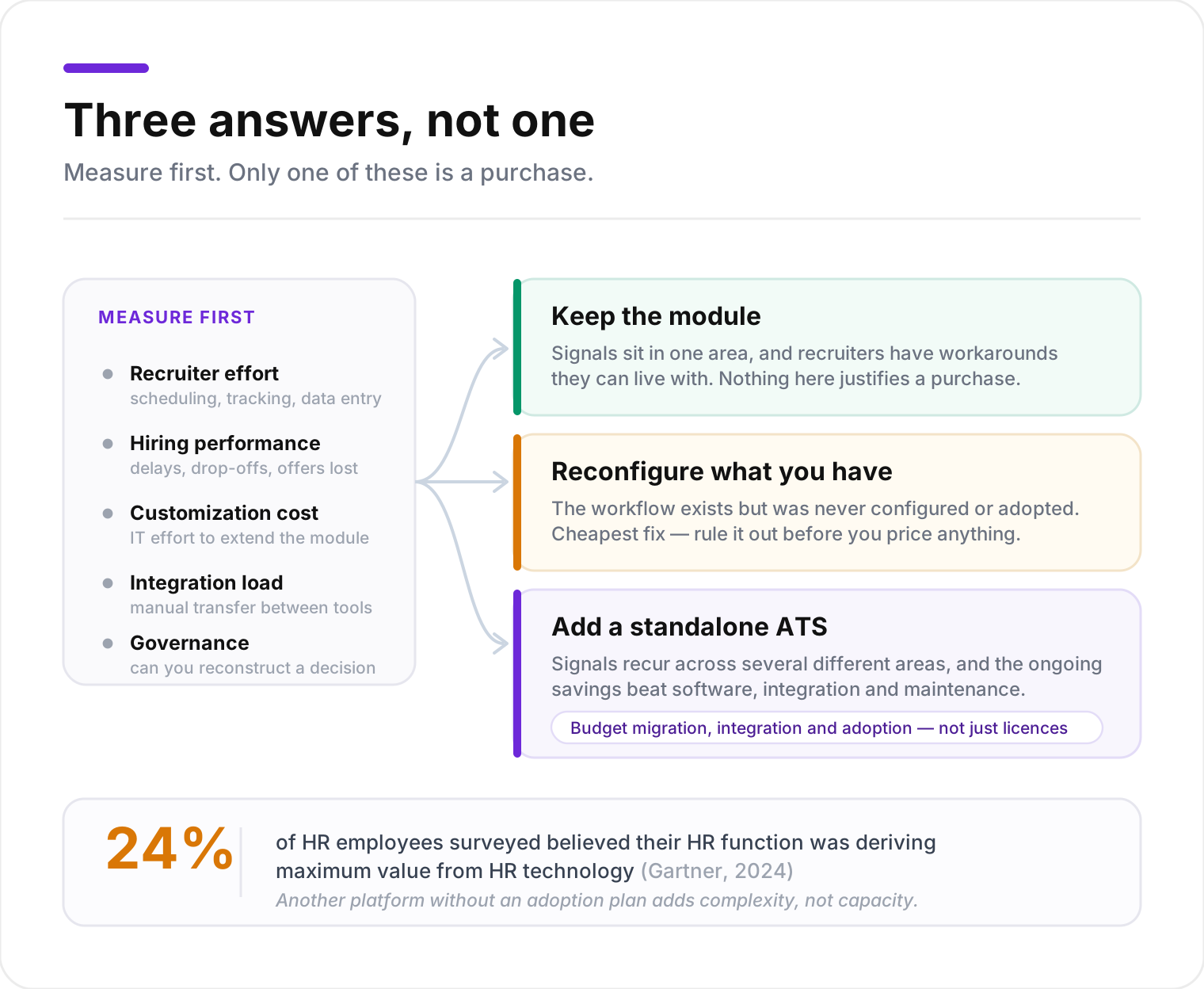
Start by measuring:
- Recruiter effort: How much time goes into scheduling, tracking, follow-ups and manual data entry?
- Hiring performance: Where do delays, candidate drop-offs and offer losses occur?
- Customization costs: How much effort does IT spend extending the HRMS recruiting module?
- Integration requirements: Which recruitment tools already exist, and how much data is transferred manually between them?
- Governance: Can the system produce reliable records of candidate decisions, approvals and access?
Then compare three approaches: keep the current module, improve its configuration, or introduce a dedicated ATS. A standalone ATS is easier to justify when recurring operational savings and faster hiring outweigh the added software, integration and maintenance costs. If you decide to proceed, an ATS implementation plan will help you manage migration, integrations and user adoption.
Connect enterprise recruiting to your existing HRMS with RippleHire
When your HRMS recruiting module can no longer keep up with enterprise hiring, a dedicated ATS gives recruitment teams the workflows they need while your HRMS stays the system of record. RippleHire is the ATS where Recruiters and Agents work together. Agents coordinate the work, and Recruiters close.
RippleHire supports enterprise recruitment with:
- High-volume hiring workflows: Manage campus recruitment, walk-in drives and interview panels.
- AI agents in the workflow: Use Amy, the AI interview agent, and the AI Voice Agent to support screening and interviews.
- Recruiter productivity: Simplify applications, communication, scheduling and follow-ups.
- Verification and onboarding: Coordinate documentation, background checks, offers and pre-joining activities.
- HRMS integration: Connect recruitment workflows to core HR systems through RHConnect, RippleHire’s no-code, API-first integration framework.
RippleHire integrates with SAP SuccessFactors, Oracle and Workday, so recruitment operations connect to your existing HR technology stack.
Book a demo to see how RippleHire can support your enterprise recruiting workflows alongside your existing HRMS.
Frequently asked questions
What is the difference between an HRMS and an ATS?
An HRMS manages employee information and HR processes such as payroll, benefits, attendance and performance management. An ATS manages the recruitment lifecycle, including applications, screening, interviews and offers. Some HRMS platforms include recruiting modules with ATS functionality, so the practical difference comes down to recruiting depth. Compare supported workflows, configuration options, candidate communication and integration capabilities before deciding whether separate software is necessary.
How can an enterprise evaluate its existing HRMS recruiting module?
Start by documenting the recruitment workflows you use today, including regular hiring, campus recruitment, internal mobility and any specialized processes. Next, ask recruiters and hiring managers where manual workarounds happen, and review communication delays, reporting limitations and approval workflows. Finally, test whether existing features or configuration changes can solve those problems. This separates technology limitations from issues caused by incomplete implementation or low adoption.
What data should move between an ATS and HRMS?
The systems generally exchange approved requisition details, organizational information, offer data, onboarding information and employee identifiers. Define data ownership field by field. For example, the HRMS may own department and position codes, while the ATS manages interview feedback and candidate progression. Sensitive candidate information should move only when an approved business purpose requires it, and integration requirements should specify access permissions, validation rules, error handling and retention responsibilities.
How can companies avoid duplicate candidate and employee records?
Set a consistent method for matching records before building the integration. Candidate profiles may hold multiple applications, while employees need a stable identifier in the HRMS. The integration should recognize existing employees, returning candidates and rehires so it creates new employee records only when needed. Teams should also define how corrections flow between systems and who resolves mismatches, then test these scenarios before deployment.
What should CIOs check before approving a standalone ATS?
CIOs should evaluate security, integration architecture, data ownership, vendor support and total cost of ownership. The assessment should cover API availability, authentication, access controls, audit logs and how sensitive candidate information moves between systems. Include scalability tests at realistic recruitment volumes, and involve recruiters and hiring managers in the evaluation, since daily adoption determines the return on the investment.